Animated Banner

Animated Banner
Cyber Generation For Better Future

Ads

Popular Article

Showing posts with label windows. Show all posts

Saturday, May 20, 2017

Ransomware Definition - Cyber X Generation Tech News

What is Ransomware?

Ransomware (    ) is defined as a type of malicious software that block access to data and threatens the Data's owner to pay a sum of money if they want the data back. Some ransomware also threatens to publish the data for money.

A simple ransomware usually lock the system in a way which is not difficult for a knowledgeable person to reserve, but the more advanced malwares uses a technique called cryptoviral extortion which will encrypts the victim's files and document, making them inaccessible, then they will ask the victim to pay a sum of money to decrypt them. 

Ransomware may also encrypt the computer's MFT (Master File Table) or even the entire hard drives. Thus, ransomware is a denial-of-access attack that prevent users from accessing files since it is intractable to decrypt the files without dectyption key.

Ransomware attacks are typically carried out using a Trojan that has a payload disguised as a legitimate files.

Ransomware infection were first seen in Rusia between 2005 - 2006. Trend Micro published a report on case in 2006 that involved a ransomware variant which was detected as TROJ_CRYZIP.A will zip a certain file types before overwriting the original files, leaving only the password-protected zip files in the user's system. It also create a text file that acted as the ransom note informing the users that the files can be retrieved in exchange for $300.

In its earlier years, ransomware typically encrypted particular file types such as DOC, XLS, JPG, ZIP, PDF, and other commonly used file extensions.

Thursday, January 17, 2013

How to Check Suspicious Executable File

       Today I've found an executable file named "000.exe" and my friend accidentally clicked on it, and the result is some of registry file has been changed. Well, I know that because the task manager has been locked for some reason, I just want to check the process the file created (since my Avira didn't detect any virus for it).

       I unlocked the task manager by doing registry edit from run command (check there how to get to a run command), then regedit (fortunately, it's not disabled). Search for "DisableTaskMgr" by hitting F3, and then change the value into 0. And there.... you can see your task manager once again.

      I checked on the processes, but It seems doesn't have anything suspicious, I even use "HijackThis" to check through the hidden process and use CCleaner to see anything suspicious in my startup options. 

      So far, I don't see anything yet.... I decided to do some search on google about how to see/trace any executable file create or changes in your system. And finally I got an answer of my need. I found this great site.

Monday, November 26, 2012

Desktop Fences Separator

Too many messy icons on your desktop? do you want to separate which one is Games, multimedia, tools, etc?

I found a tools called "desktop fences", with this tools we can make any separate spaces for those icons in the Desktop.

Fenced Desktop Icon
 

How to use it?


Sunday, November 25, 2012

Windows 7 Home Basic Color Changer Tool

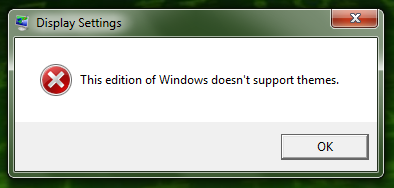
       Changing windows theme is one of usually things appeared in mind to beautify our windows appearance. But, what should we do if this warning appeared?

This edition of Windows doesn't support themes.

Well, if you get this warning/notification/error/whatever you want to call it, don't give up. This usually appear because the windows 7 we have is either home basic or starter edition. So, how to change the colors? 

Sunday, September 30, 2012

How To Add A Program into Run Command

What is Run Command?
Run Command - Win XP

Run command is used to directly open an application or document whose path is known. It functions more or less like a single-line command line interface.

In the GNOME interface, the Run command is used to run applications via terminal commands. It can be accessed by pressing Alt+F2. KDE has similar functionality called KRunner, it's accessible via the same key binds. In the BASIC programming language, RUN is used to start program execution from direct mode.

Run Command on windows XP can be opened by clicking on "Run" which is placed on Start menu.

On windows vista and win 7, the Run Command still available, it's just doesn't appeared on Start Menu list.

Run Command - Win 7

How to open Run Command window in win Vista/7?
It's easy, just simply press windows button + R on your keyboard (press and hold windows button, then press R)


Windows Button on Keyboard

And now let's get to the our Main Business, about how to add a program into Run Command. There are some methods to do this:

Saturday, June 2, 2012

How to Dual Yahoo Messenger

Click Here To get your Yahoo!Messenger
                Who don't know Yahoo? And Yahoo! Messenger? Yahoo Messenger (usually abbreviated as Y!M or YM) is an instant messenger for free to chat with friends, make PC calls, SMS, share files, share photos, listen to streaming radio and more. Nowadays, YM also available for phone users, especially for those smart phones.


                        Some of Yahoo Messenger Version already enabled dual login mode, which means it's enabled the user to run 2 Yahoo Messenger at once with a different login. How to test if your Yahoo Messenger supported dual mode? Well then try to run another Yahoo Messenger while there's a Yahoo Messenger that already run. If the second Yahoo Messenger not appear, then the dual mode disabled. 

               Don't worry, today I'll teach you to enable the dual Mode on windows XP. This is what you need to do.

1. Click on start menu and choose Run.
Startmenu > Run


Thursday, May 24, 2012

How To Take A Screenshoot on Windows

Hello today we will learn about how to take a screenshoot...

What is a screenshoot? Screenshoot is a captured image of your desktop view that can be saved as an image file. This is very useful, especially if you found a bug on games, or some error from your PC and want to share it to your tech administrator.

How to take a screen shoot?

First, take a look around at your keyboard, there are so many buttons there, but only 1 Button you must aware the Print screen Button (Prt Scr)

Print Screen Button On Keyboard